Checking GPS Status
To check the GPS status of your Burro, follow these steps:Quick View
Click on the GPS status icon in the top left corner of the main menu to get an overview of the GPS status.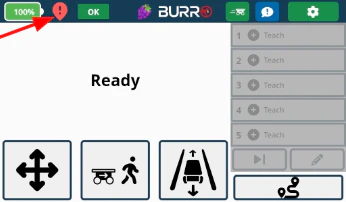
Advanced View
For adjusting localization methods and base station pairing/re-pairing, navigate to: Settings → General → GPS
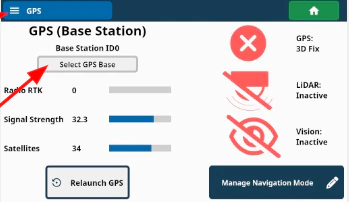
Pairing to a Burro Base Station
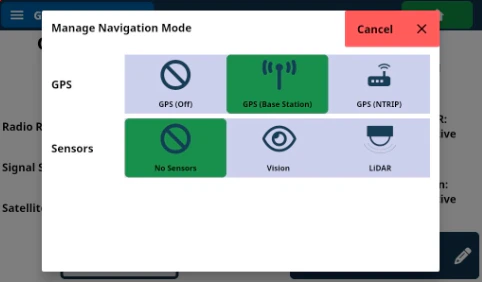
Manage Navigation Mode
Click the “Manage Navigation Mode” button.Set GPS Option
Ensure that GPS is set to the “GPS (Base Station)” option. If it’s not, adjust
the setting and press the “Apply Changes” button.Select GPS Base
Pair with your base station by using the “Select GPS Base” button.Enter Base Station Serial Number
Type the 4 digits of your base station S/N (located on both the base station itself
and its yellow carrying case). For example: If the S/N is 3016, enter 3016.Save the Configuration
Click ‘Save’. Burro is now paired indefinitely to this base.Pairing to a Different Base Station
Repeat this process to pair to a different base station as needed.GPS Settings for RTK Corrections
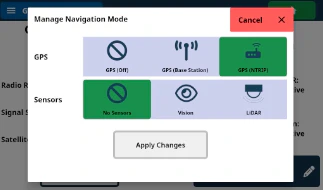
NTRIP is included with Burro Grande’s autonomy.
- Ensure that the GPS setting is set to “GPS (NTRIP)” if using Burro & Burro XL for purely indoor operations.
- Recommendation: If the area where Burro will be running GPS-trained routes has poor cellular coverage, switch to a Burro base station for RTK over radio.
Training Routes
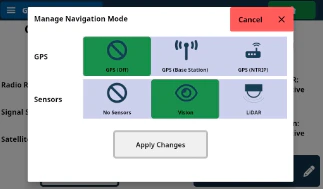
Training Routes on Vision
- Turn off GPS and train routes using vision.
- Burro will learn routes by using recorded images with its back cameras (localization on vision only).
- Set GPS to “GPS (Off)” and the Sensors setting to “Vision.”
This method is limited to carrying only in areas with small indoor sections.
Towing indoors is only possible with LiDAR.
Indoor Navigation Settings
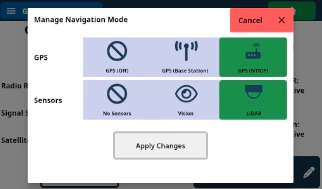
- The Sensors setting should always be set to “LiDAR” to enable full indoor navigation capabilities for both carrying and towing.
- The 3D LiDAR mount that comes with Burro Grande and the Indoor Navigation Pack unlocks seamless indoor navigation.
Seamless Indoor/Outdoor Navigation
For seamless transitions between indoor and outdoor autonomous navigation:- Set GPS to either GPS (Base Station) or GPS (NTRIP) as shown in the relevant images.