Crop Scouting
- If the Crop Data Package is installed, users can visualize the amount of fruit in their field while running Row to Row.
- Burro can carry equipment from other crop data providers (such as Bitwise Agronomy AI, Green Atlas, Bloomfield Robotics, etc.) to enable scouting in crops beyond just table grapes.
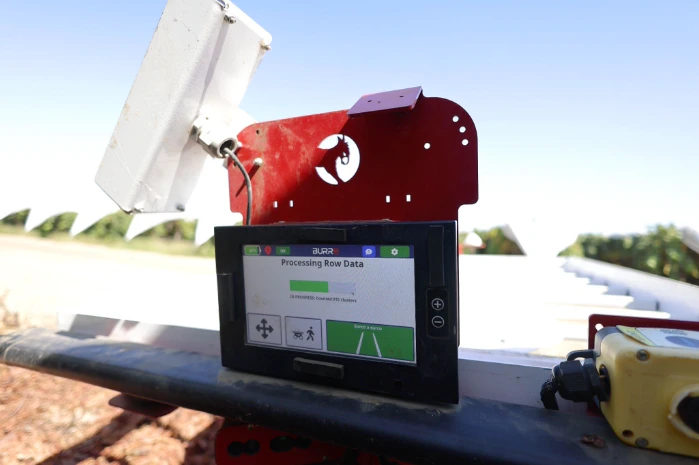
Starting Row-to-Row Autonomy
To initiate Burro’s Row to Row autonomy, bring Burro to the end of the desired row and follow these steps on the touch screen:Row-to-Row Settings
Clicking the settings icon from the Row to Row mode displays the following options: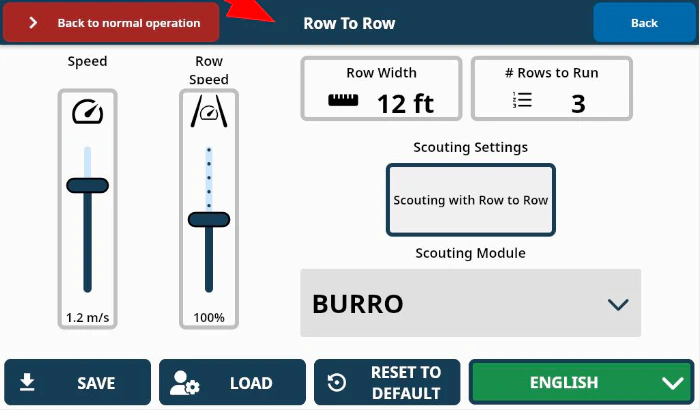
- Row Width: Input the distance between rows correctly so that Burro turns with the appropriate radius when exiting a row to continue to the next.
- Rows to Run: Set the number of tunnels that Burro will navigate through before stopping.
Crop Scouting Setup
Under the Scouting Module:- Select the crop scouting model you wish to use (BURRO is set by default).
- Press the Scouting with Row to Row button in the Row to Row settings menu.