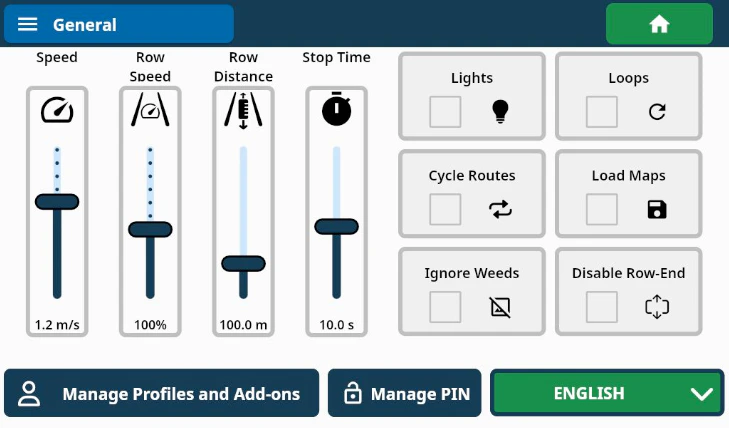
Sliders
Speed
Adjusts the overall speed of Burro.Row Speed
Modifies Burro’s Row Navigation speed according to the displayed factor.Row Distance
Defines the distance Burro will travel forward in the row during Row Navigation.Stop Time
Controls the duration for which Burro will pause its autonomy at a user-defined station during the “Teach & Repeat” phase in Auto Routes mode.Profiles and Add-ons
- Change your use case profile here, similar to how you can from the main menu.
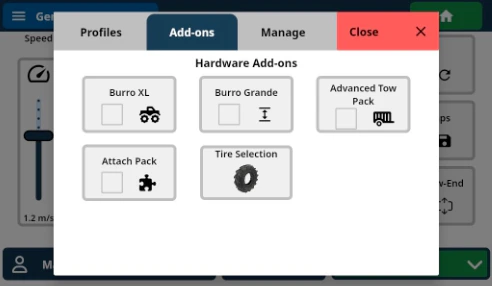
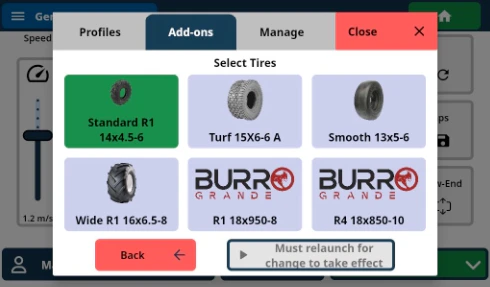
- If you’ve recently changed Burro’s wheels to a different tire, or if you’ve installed or uninstalled a Burro accessory (such as the XL kit or Burro GRANDE retrofit), update Burro’s configuration for that here.
Only official accessories and add-ons are supported for use with Burro.
Utilizing non-supported tires may adversely affect localization and overall
performance. For optimal functionality, please ensure that all components are
genuine and compatible.
Manage PIN
If you’d like to set a PIN so that only authorized users can access the settings menu on Burro, you can do that here.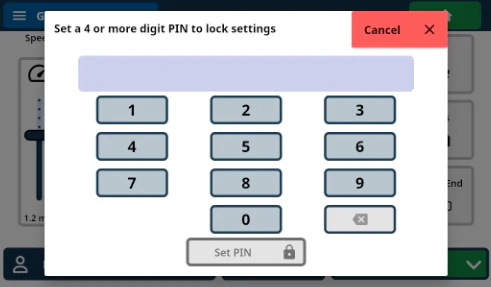
Language Selection
Toggle between the following languages:- English
- Spanish
- Japanese
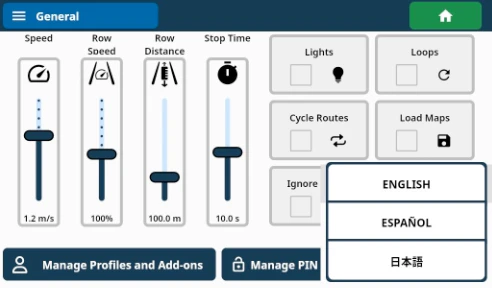
Settings - Side panel
Lights
Activates all four of Burro’s LED lights.The LEDs will flash in specific scenarios: they will flash slowly when Burro
is stopped and rapidly if an obstacle is detected while operating in any
autonomous mode. These indicators will function regardless of whether the
“Lights” setting is enabled.
Loops
Enables continuous, non-stop movement along a single route that has been trained as a closed ‘loop’ or ‘circuit’. This feature does not apply when using the Nursery OS.Cycle Routes
- When multiple routes are in use, Burro will progress from one route to the next in numerical order and then repeat the sequence. This feature is inactive when “Loops” is enabled (see Slide 21 for further details) or when using the Nursery OS.
Load Maps
Routes currently loaded in a route slot during Auto Mode will remain available after exiting Auto Mode or powering Burro off and on again. This feature does not apply when using the Nursery OS.- Warning: If you re-enter Auto Mode with “Load Maps” disabled, all previously loaded routes will be deleted from Burro.